-
MmDetection demo.jpg 인퍼런스해보기Mmdetection 2024. 10. 2. 03:23반응형
설치가 완료되면 테스트로 pre-trained된 모델을 활용하여 demo.jpg를 inference해보겠다.
다운받게될 faster_rcnn_r50_fpn_1x_coco_20200130-047c8118.pth은 faster-rcnn모델로 cocodataset을 통해 학습한 모델이고 inference할 demo.jpg는 mmdetection에서 테스트용으로 제공하는 파일이다.
mmdetection 디렉터리로 이동한다.
mmdetection은 앞으로 개발을 할때 루트 디렉터리가 될 예정이다.미리 pre-trained된 모델을 사용해서 coco 데이터셋의 demo.jpg를 inference 해야한다.
wget -O /mmdetection/faster_rcnn_r50_fpn_1x_coco_20200130-047c8118.pth http://download.openmmlab.com/mmdetection/v2.0/faster_rcnn/faster_rcnn_r50_fpn_1x_coco/faster_rcnn_r50_fpn_1x_coco_20200130-047c8118.pth위 명령어를 입력해서 pre-trained된 모델을 다운받는다.
이후 이 명령어를 입력하면 demo.jpg를 다운받을 수 있다.
wget -O demo.jpg https://github.com/open-mmlab/mmdetection/raw/master/demo/demo.jpg이후 infernce_script.py를 입력하고
(주의! 파일경로에 주의해서 본인에게 맞는 파일경로를 설정할 것)
# inference_script.py
import os
import cv2
import matplotlib.pyplot as plt
from mmdet.apis import init_detector, inference_detector, show_result_pyplot

#Config 파일과 Checkpoint 설정
config_file = 'configs/faster_rcnn/faster_rcnn_r50_fpn_1x_coco.py'
checkpoint_file = '/faster_rcnn_r50_fpn_1x_coco_20200130-047c8118.pth' #다운받은 위치를 넣을것

#모델 초기화
model = init_detector(config_file, checkpoint_file, device='cuda:0')

img_path = 'demo.jpg'#다운받은 위치를 넣을것
if not os.path.exists(img_path):
    os.system(f'wget -O {img_path} https://github.com/open-mmlab/mmdetection/raw/master/demo/demo.jpg')

#이미지 불러오기
img = cv2.cvtColor(cv2.imread(img_path), cv2.COLOR_BGR2RGB)

#Inference 수행
results = inference_detector(model, img_path)

# 결과 시각화
plt.figure(figsize=(12, 12))
plt.imshow(img)
plt.show()

# Bounding box 시각화
show_result_pyplot(model, img_path, results)

# 모델 Config 출력
print(model.cfg.pretty_text)
python inferecne_script.py를 실행한다.
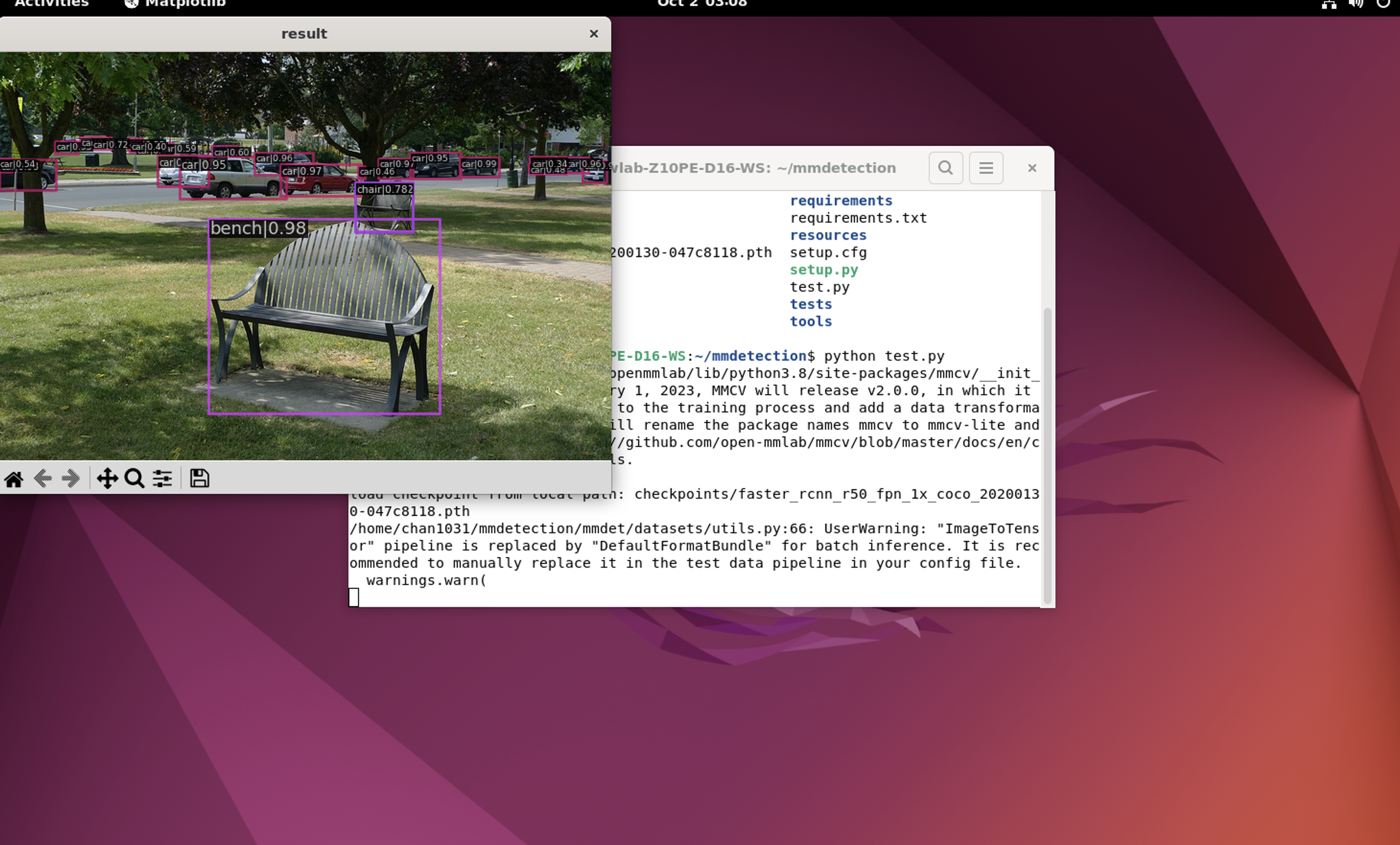
inference 완료 화면 매우 간단한 테스트를 완료하였다.
mmdetection 2.X 버전이 잘 실행됨을 확인하였다.
앞으로 이를 활용해서 커스텀 데이터 셋을 만들고, config 커스터마이징, 백본 제작 등을 해볼 수가 있다.
반응형'Mmdetection' 카테고리의 다른 글
(MmDetection) VisionTransfomer 백본으로 학습해보기 (4) 2024.10.22 (MmDetection) 훈련 성능 지표 확인하는 법 (6) 2024.10.18 (mmdetection) 커스텀 데이터셋 훈련하기 (9) 2024.10.09 (MmDetection) 중단된 훈련을 이어서 진행하는 방법 (3) 2024.10.07 Linux환경에서 Mmdetection2.X 버전 설치방법 (6) 2024.10.02